
 MES
Which System Allows Tracking the Production History of Each Serialized Unit?
What's inside serial number 0431?
The question sounds routine, but it is precisely what is asked by the customer, the military representative, and your quality department. The unit has been assembled and shipped, yet its bill of materials, component lots, and supplier certificates have to be pieced together from invoices and memory. The answer isn't known by the system, but by a specific person—and only as long as they are on duty.
Sales & CRM automation
Pipeline, customers, operations and analytics driven by processes, not spreadsheets.
SYNTECH Manufacturing is an MES/MRP system where the production history of each serialized unit is tracked in a single database alongside orders, warehouse, quality, and shipments. Below, we explain what the system stores about a unit, how to search bidirectionally, and where its limits lie.
This article is for production directors, quality and compliance managers, chief engineers, and manufacturing process technologists, as well as IT executives who need to answer questions about a specific unit in minutes, not in a week.
What a Unit's Production History Should Contain in SYNTECH Manufacturing
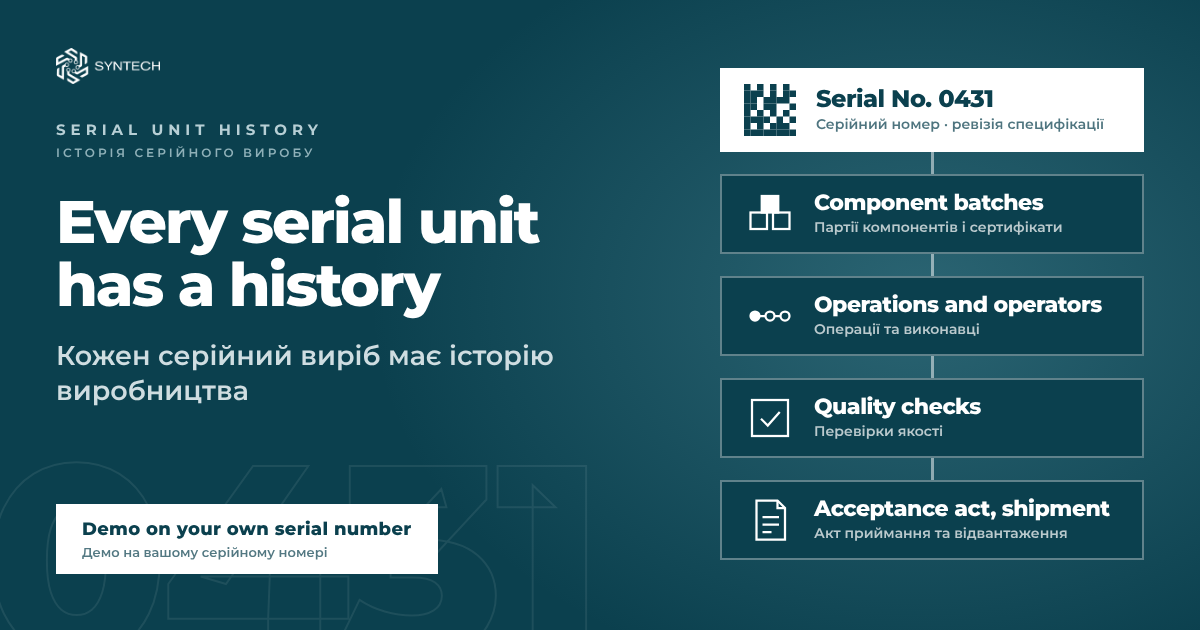
The production history of a serialized unit (referred to as genealogy in industry literature, while the ability to trace each individual unit is called unit-level traceability) is not a single document, but a set of connected records. In SYNTECH Manufacturing, you scan a serial number and see:
the BOM/specification revision according to which the unit was built;
component lots, the complete bill of materials;
supplier certificates for these lots;
operations and the operators assigned to each of them;
quality inspection results;
acceptance and shipment certificates.
This is a simple rule for every query: SYNTECH Manufacturing doesn't answer "about units in general," but "for serial number X." Therefore, the answer does not depend on who remembers where a certificate was filed or from which lot a component was taken.
From Serial Number to Lot and Back: Recall in SYNTECH Manufacturing
Search in the SYNTECH Manufacturing traceability module operates by lot and by serial number in both directions. These are two practical scenarios.
Upward from the serial number—an answer for the customer or military representative: which revision, which lots, which certificates, who assembled it and in which operations, which inspections it passed, under which certificate it was accepted, and where it was shipped.
Downward from the lot—a reaction to an issue. If a component lot turns out to be defective, SYNTECH Manufacturing shows which units it went into. Everything affected is blocked or recalled in a single action, and the list for customer notifications is exported to Excel. Without such a system, this means days of digging through archives, and the answer still remains approximate.
Why SYNTECH Manufacturing Answers This from a Single Database
A unit's history compiles itself if data doesn't have to be stitched together across systems. In SYNTECH Manufacturing, sales, purchasing, contracts, manufacturing, warehouse, quality, and costs reside in a single database. There is no connector, no nightly data sync, and no duplicate item master between CRM and MES.
The workflow runs without re-entering data: from a purchase request with approvals to receipt, bin, operation, quality inspection, and shipment. Therefore, every action taken with a unit leaves a trace right where it can be found later.
To ensure the history is complete, SYNTECH Manufacturing shows the audit trail on three levels:
warehouse—lots, bins, receipt, and issuance of components;
production—operations, operators, quality inspections, and non-conformances;
contract—acceptance certificate, shipment, and customer.
Labeling: Making Units and Lots Scannable
History in a database is worthless if a unit or lot cannot be identified on the shop floor. Therefore, SYNTECH Manufacturing supports labeling at both levels:
serialized unit—DataMatrix label with a template, preview, and print history;
lot—label with code, quantity, manufacturing date, expiration date, and Code 128 barcode.
Labels are printed from the SYNTECH Manufacturing print center, and templates are designed in a visual builder with placeholders, barcodes, and previews. In the warehouse, stock balances are visible in the inventory movement log, complete with lot, quantity, bins, document, and responsible person. Bins can be searched by zone, item, lot, or serial number.
Revision, As-Built Record, and "As-Designed vs. As-Built" Reconciliation
A production history without a revision is only half the answer. That is why in SYNTECH Manufacturing, a serial number is tied to the specification revision: when an engineer releases an ECO, you can see from which unit the new revision took effect. This closes the question "which revision was this unit assembled under?", which no one can answer without a system.
For each unit, SYNTECH Manufacturing maintains:
device history record (DHR) and electronic traveler;
"as-designed vs. as-built" reconciliation, comparing the planned bill of materials with the actual one;
unit configuration variants, part of configuration management. This is an Autumn 2026 update.
Without "as-designed vs. as-built" reconciliation, a unit's history remains a story of what was supposed to be. With it, SYNTECH Manufacturing shows what was actually installed in practice.
Defense Module in SYNTECH Manufacturing: Acceptance Certificates and the Two-Person Rule
For defense manufacturing, unit history is locked to the acceptance certificate. In the SYNTECH Manufacturing defense module, these are native sections, not custom one-off project tweaks:
military acceptance certificates with shipment gating;
NATO codification (NSN, NIIN, NCAGE);
state defense contracts with delivery schedules and advance payments;
traceability and recalls.
Every serial number in SYNTECH Manufacturing knows its acceptance certificate, and records that affect unit history are governed by the two-person rule: an author cannot approve their own record. This applies to approving requests, work orders, non-conformances, and acceptance certificates. Order and request statuses change only through predefined workflows, and the server validates each change. Therefore, it is virtually impossible to backdate unit history in SYNTECH Manufacturing.
An Honest Look at SYNTECH Manufacturing's Boundaries
We benchmarked SYNTECH Manufacturing against a matrix of 29 business requirements for Ukrainian defense manufacturing and scored it strictly. "Compliant" means the requirement can be fully satisfied out of the box today. The result was 27 compliant and 2 non-compliant. We currently do not have a registry for state secret security clearances or catalog synchronization with DOT-Chain Defence.
There are two more practical clarifications. First, most new features in SYNTECH Manufacturing are delivered disabled or in warning mode, so the plant enables them when ready. Second, during demos, we also show what the product does not do.
Frequently Asked Questions
What is visible when scanning a serial number in SYNTECH Manufacturing? The BOM revision, component lots, supplier certificates, operations and operators, inspection results, acceptance certificate, and shipment details.
What should be done if a component lot turns out to be defective? SYNTECH Manufacturing shows all units into which it was incorporated. Everything affected is blocked or recalled in a single action, and the list for customer notifications is exported to Excel.
Is integration between CRM and MES required? In SYNTECH Manufacturing, it is not needed: everything lives in a single database, without connectors or nightly syncs.
Let us show you a single serial number from supplier certificate to acceptance certificate in SYNTECH Manufacturing — request a demo.
SYNTECH on social media: Company LinkedIn · Author's LinkedIn
Next step
Get a 30-minute automation assessment
15–30 minutes, no slide decks: we show the solution on your data and tell you if it fits.