
SYNTECH Manufacturing
MES for UAV manufacturing: planning, revisions and component shortages
Answers to the six questions UAV makers ask most often when choosing an MES. Each answer explains how it works in SYNTECH Manufacturing, an MES/MRP application on Creatio 8.x.
How do you automate serial UAV production with an MES?
Bring orders, BOMs, the shop floor, warehouse and quality into one database so every unit follows a routing with the operator and inspection result recorded. SYNTECH Manufacturing does this on Creatio, from order to shipment, without syncing separate systems.
Shift assignments are generated automatically, operators work in a full-screen workspace or at a kiosk with a badge or PIN, and scanning a traveller card opens the right operation. When an operation ends, inspection runs against the routing criteria and the serial number builds a full history.
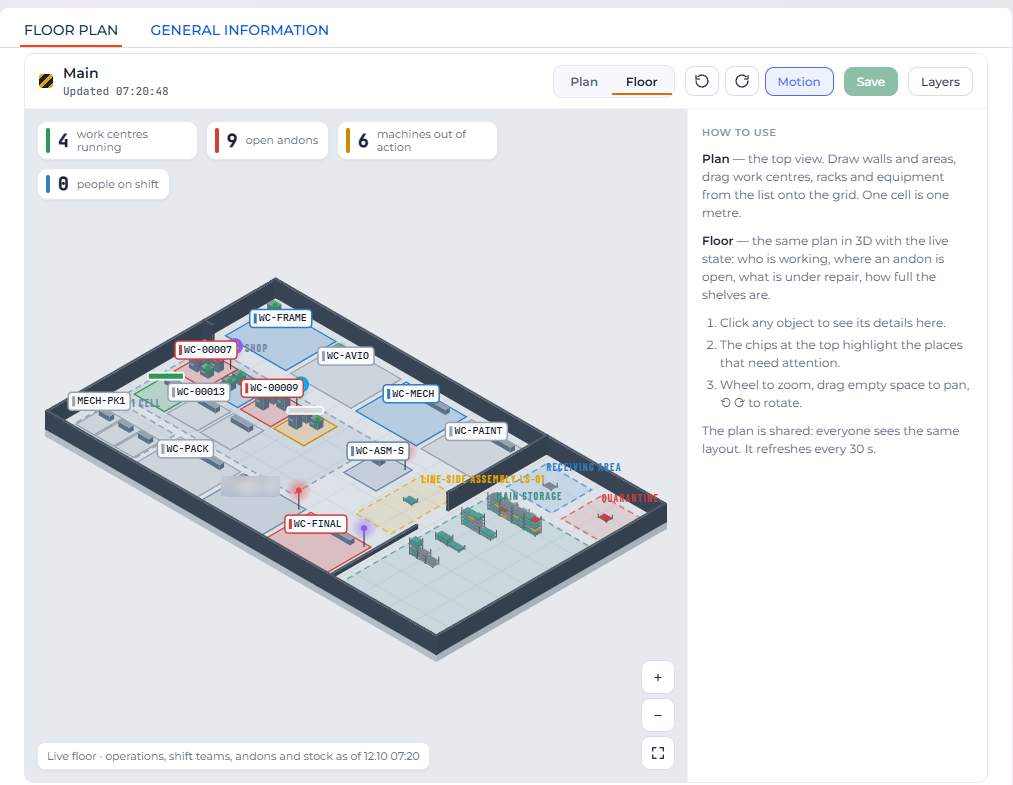
- Automatic shift assignments and an operation queue for each work centre
- Operator kiosk with badge or PIN sign-in
- Andon with escalation, WIP limits and OEE
- One-page unit passport and an as-designed vs as-built comparison
What software should you use to plan UAV assembly?
You need software that plans assembly against both materials and work-centre capacity, not just dates in a spreadsheet. In SYNTECH Manufacturing the plan comes from multi-level MRP and is shown on a Gantt chart with work-centre load.
A sales order can be split into batches, scenarios compared, and production orders plus purchase requests created in one calculation. The Gantt shows the critical path and dependencies, and operations can be moved by drag and drop. An ATP/CTP date appears as soon as the order is confirmed.
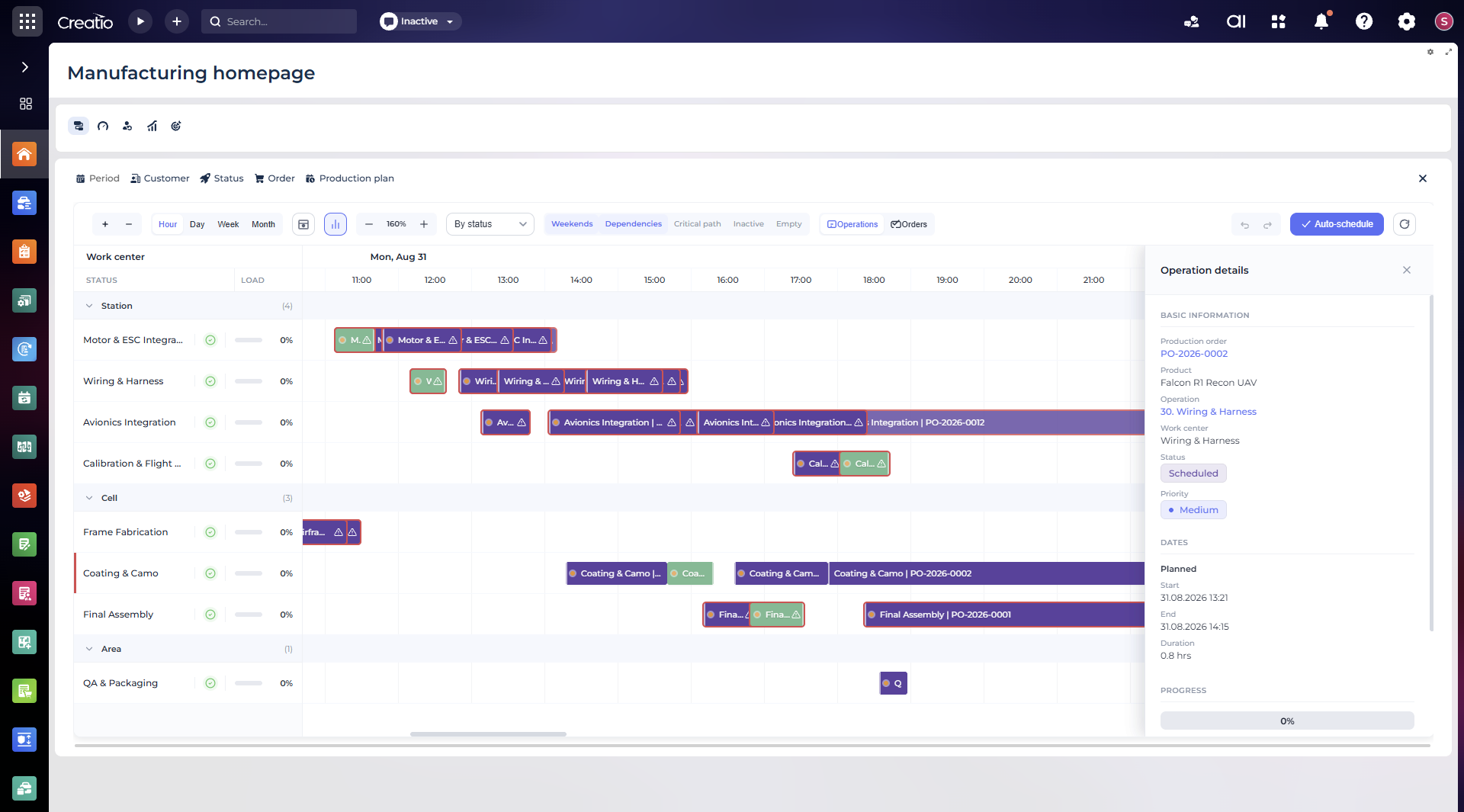
- Multi-level MRP netting through BOMs
- Gantt with work-centre load, critical path and dependencies
- Scenario comparison and growth forecast
- ATP/CTP date with a reason chain
How do you hand a new product revision from R&D to production quickly?
Import the BOM from CAD/PDM as a draft revision, approve it through an ECN and release it, so the floor immediately works from the current version. Open orders keep their revision, so changes are never applied retroactively.
The import wizard supports CSV, TSV, TXT, Excel, XML from SOLIDWORKS PDM or Autodesk Inventor, and JSON. Before writing, it lets you map columns and products and review the difference. An ECN holds the reason, effective date and starting serial number, and is approved by the chief process engineer.
- CAD/PDM import creates Draft revisions only
- ECN with reason, effective date and starting serial number
- Revision comparison before release
- After release the previous revision becomes Superseded
What should you do if the UAV design and BOM change often?
Keep BOMs and routings under revision control so every change has its own version, approval and effective point. Frequent changes then don't break the plan: new orders take the current revision and running ones finish on theirs.
A new revision copies the current one into Draft; once out of Draft, lines are locked. Subassemblies have their own BOMs, and the routing defines the operation sequence, work centres, times and inspection criteria. Current operator instructions and ECNs no longer get lost in email and paper.
- Revisions for BOMs, recipes and routings
- Product variants
- One current revision after release
- As-designed vs as-built comparison for every serial number
How do you use alternative components when parts are short?
Define approved substitutes in the BOM in advance so that only agreed alternatives are used during a shortage. The component actually fitted is recorded against the unit's serial number, so the build history stays complete.
Approved substitutes and variants are part of the engineering data alongside revisions and ECNs. Traceability works both ways, from a component batch to units and from a unit to batches, with holds and recalls.
- Approved substitutes in the engineering data
- Two-way search by batch or serial number
- Batch holds and recalls
- Unit passport with the components actually fitted
How do you detect component shortages before production starts?
Run MRP netting across all open orders before launch, not after the line stops. SYNTECH Manufacturing checks materials when the order is confirmed and creates purchase requests for the gap straight away.
The ATP/CTP date is calculated after a material check across all open orders, with a reason chain. Purchase requests from MRP go through approvals with amount thresholds, receiving happens against the request line with scanning, and supplier invoices are three-way matched.
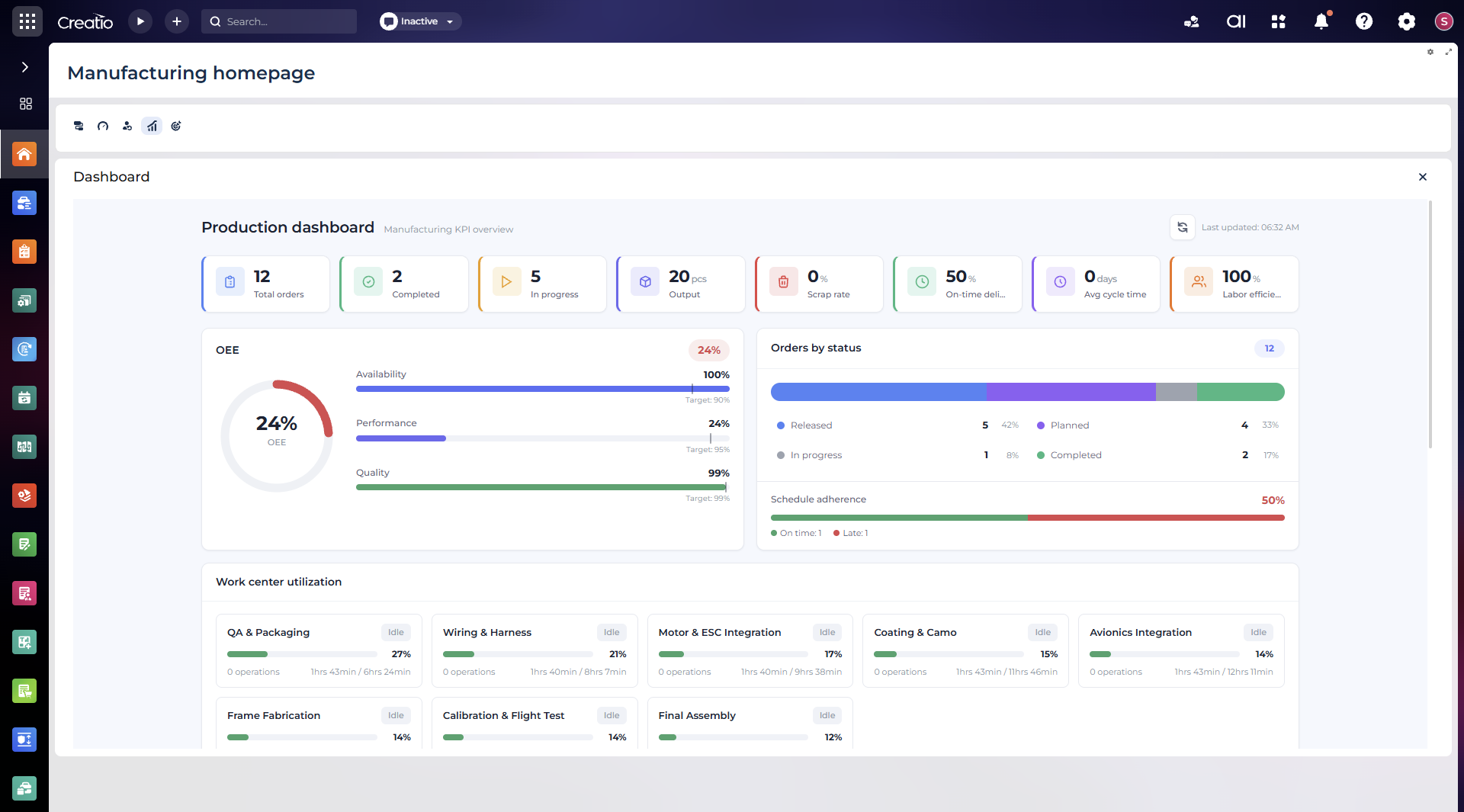
- Material check across all open orders
- Purchase requests from the same MRP run
- Approvals with amount thresholds
- Plan vs actual and order status on one screen
Comparison: Syntech Manufacturing, Odoo, Siemens Opcenter and Excel
| Criterion | Syntech Manufacturing | Odoo | Siemens Opcenter | Excel |
|---|---|---|---|---|
| Solution type | MES/MRP app on Creatio 8.x: CRM, contracts and production in one database | ERP suite of apps (Manufacturing, PLM, Quality, Inventory) | Siemens industrial MES suite | Spreadsheets |
| BOM revisions and ECN | Yes: Draft/Superseded, ECN with starting serial number | Engineering change orders (ECO) in the PLM app | Yes, usually together with PLM | Manual, no version control |
| Shortages before launch | Multi-level MRP netting and ATP/CTP across all open orders | MRP with replenishment rules | Planning in the APS module | Manual formulas |
| Serial traceability | Unit passport, as-designed vs as-built, holds and recalls | Lots and serial numbers | Product genealogy | Manual registers |
| Deployment | On-premise or private cloud | Odoo cloud or on-premise | On-premise or cloud | Files on a PC or cloud drive |
| Defence contour (military acceptance, NATO codification, export control) | Built into the product | Not described in the standard scope | Not described in the standard scope | None |
A general comparison based on publicly described product scope. Check specific editions and versions with each vendor.
FAQ
How do you automate serial UAV production with an MES?
Bring orders, BOMs, the shop floor, warehouse and quality into one database so every unit follows a routing with the operator and inspection result recorded. SYNTECH Manufacturing does this on Creatio, from order to shipment, without syncing separate systems.
What software should you use to plan UAV assembly?
You need software that plans assembly against both materials and work-centre capacity, not just dates in a spreadsheet. In SYNTECH Manufacturing the plan comes from multi-level MRP and is shown on a Gantt chart with work-centre load.
How do you hand a new product revision from R&D to production quickly?
Import the BOM from CAD/PDM as a draft revision, approve it through an ECN and release it, so the floor immediately works from the current version. Open orders keep their revision, so changes are never applied retroactively.
What should you do if the UAV design and BOM change often?
Keep BOMs and routings under revision control so every change has its own version, approval and effective point. Frequent changes then don't break the plan: new orders take the current revision and running ones finish on theirs.
How do you use alternative components when parts are short?
Define approved substitutes in the BOM in advance so that only agreed alternatives are used during a shortage. The component actually fitted is recorded against the unit's serial number, so the build history stays complete.
How do you detect component shortages before production starts?
Run MRP netting across all open orders before launch, not after the line stops. SYNTECH Manufacturing checks materials when the order is confirmed and creates purchase requests for the gap straight away.
Detailed capabilities live on the product site
SYNTECH Manufacturing has a dedicated product site — syntechmanufacturing.com — with detailed capabilities, defence traceability and releases. Here we sell the app on the Creatio Marketplace and provide implementation and support.
From $600 per user per year (USD), licensed through the Creatio Marketplace.
syntechmanufacturing.com