
 Production
Syntech Project Management Studio for Creatio: how to manage projects without chaos
A problem every manager knows
Projects fail not due to lack of people or budget. They fail due to lack of a system.
Project management
Kanban, Gantt, scheduler and tasks — inside Creatio, without a separate task tracker.
Tasks are in spreadsheets. Deadlines are in messengers. Statuses are in managers' heads. The budget is in a separate file that no one updates in time. And when a manager wants to understand what stage a project is at, they have to spend an hour collecting information from various sources.
It is to solve this problem that SYNTECH created Project Management Studio https://marketplace.creatio.com/app/syntech-project-management-studio-creatio - a comprehensive project management solution built on the Creatio platform.
What is Syntech Project Management Studio
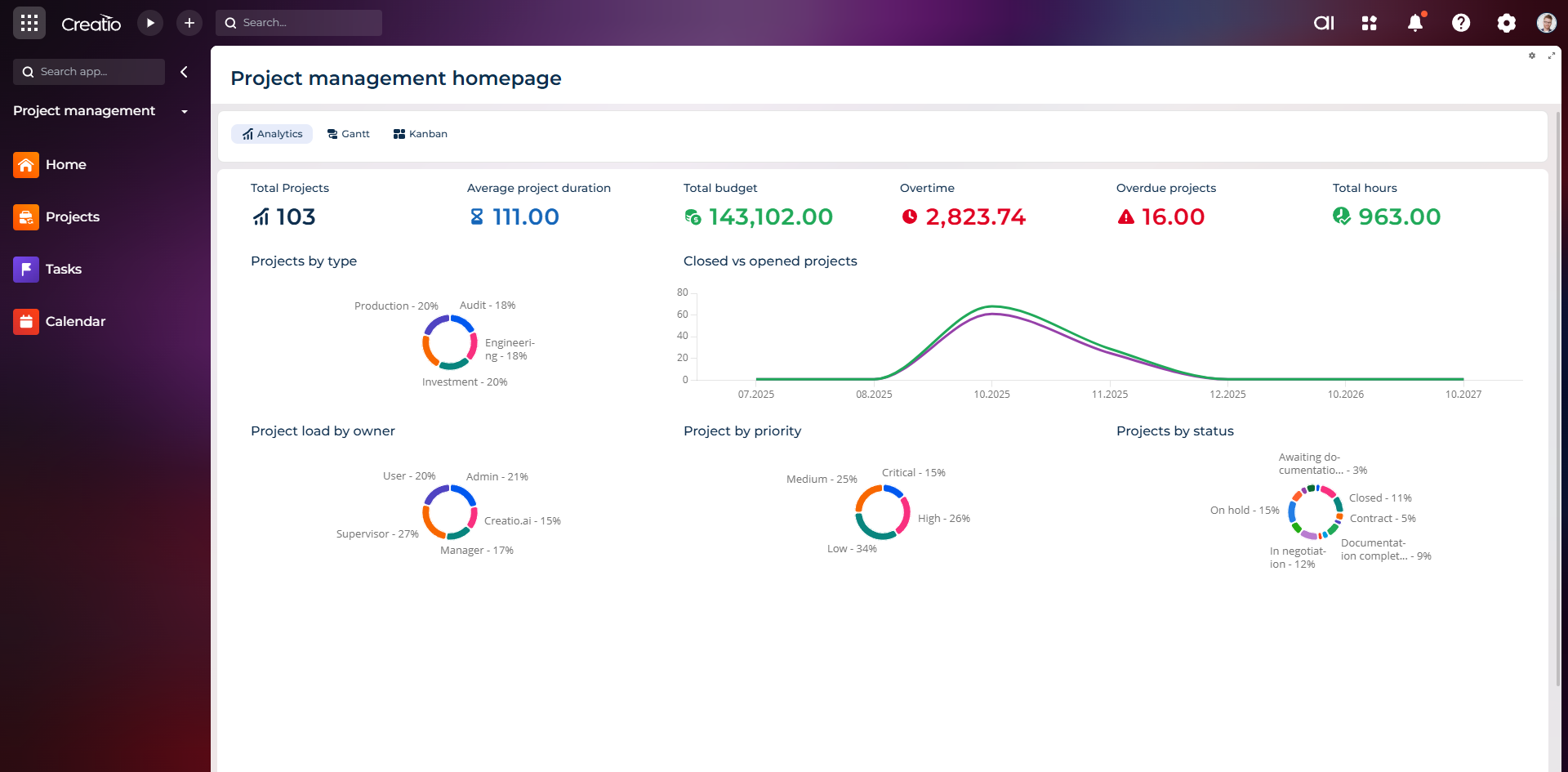
Project Management Studio is a single workspace for planning, executing, and monitoring projects of any scale directly within Creatio.
The solution covers the full project lifecycle: from initiation and structure formation to budget control and closure. Everything – in one system, with transparency for every team member.
The system is built on the no-code Creatio platform with Freedom UI, allowing you to adapt processes to business specifics without involving developers.
Key Features
Hierarchical Project Structure
Each project is organized into a clear tree-like structure: project → stages → tasks → subtasks. This allows even the most complex initiatives to be decomposed into specific actions with responsible parties and deadlines.
The manager sees the project as a whole and at the same time can delve into the details of any stage.
Gantt View - timeline visualization
An interactive Gantt chart, built as a Freedom UI component, allows you to:
— visualize task timelines and their dependencies
— edit dates directly on the chart
— see the project's critical path
— track milestones
— analyze resource loading
The chart supports different display scales – daily, weekly, monthly – and saves personal settings for each user.
Kanban View - task flow management
The Kanban board displays tasks as cards, organized into columns by status or any other field. Functionality includes:
— swimlanes for grouping by assignees or categories
— avatars of assignees on cards
— task counters at each stage
— progress bars for completion
— WIP limits to control workload
— filters and support for DCM (Dynamic Case Management)
This is an ideal tool for operational task management within a project.
Resource Management
The system allows you to assign resources to tasks, track their utilization, and identify allocation conflicts. The manager sees who is overloaded and who has free time, and can quickly reallocate the workload.
The integrated resource view helps balance the team and prevent situations where one person becomes a project bottleneck.
Budget and Financial Control
Project Management Studio includes a financial project management module. It allows you to:
— form a project budget and track its execution
— control cash flows
— record actual expenses for tasks and stages
— calculate key financial indicators
— analyze project profitability at any stage
This is critically important for businesses where projects are the main source of income: construction, consulting, IT development, custom manufacturing.
Project Templates
For typical projects, templates can be created: task structure, deadlines, roles, and budget frameworks. This allows new projects to be launched in minutes, maintaining quality standards and avoiding errors at the start.
Why Creatio as a platform
Project Management Studio is built on Creatio - and this is a strategic choice, not just a technical solution.
No-code architecture means that any changes in processes, fields, and automations are done visually, without code. The business does not depend on developers when adapting the system.
Freedom UI provides a modern, intuitive interface for all user levels - from executor to director.
A single ecosystem. Projects do not exist in a vacuum. They are connected to clients, deals, contracts. In Creatio, a project automatically receives context from CRM: client data, communication history, financial terms.
AI capabilities of the platform help predict delays, recommend optimal resource allocation, and identify risks before they become problems.
Who the solution is suitable for
Project Management Studio adapts to various business models and industries:
— IT companies and software development
— construction and engineering
— consulting and professional services
— marketing and advertising agencies
— manufacturing companies with a project approach
— integration and implementation companies
Wherever work is organized into projects with clear deadlines, budgets, and teams, this solution brings order.
How implementation looks
SYNTECH implements in stages:
Stage 1: Process Analysis. The team studies current project management approaches, identifies pain points, and determines automation priorities.
Stage 2: Core Setup. Deployment of basic modules: project structure, tasks, roles, Gantt, and Kanban.
Stage 3: Financial Module. Connection of budgeting, expense control, and profitability analytics.
Stage 4: Integrations and Scaling. Connection with CRM, ERP, external systems. Adding templates and advanced analytics.
The basic solution is launched in a matter of weeks, and the team can start working in the system at the early stages of implementation.
Results that clients get
Companies that have implemented the solution based on Creatio from SYNTECH record:
— reduction in time for project planning and coordination
— real-time transparency of statuses and workload
— reduction in the number of missed deadlines
— budget control without manual data collection
— a single source of truth for the entire team
ROI is usually achieved within 4–6 months thanks to a comprehensive approach: not just a tool, but the construction of project management processes.
Why SYNTECH
SYNTECH is a leading technology partner of Creatio with over 10 years of experience. 17 published applications on Creatio Marketplace, expertise in 7+ industries, and dozens of successful implementations.
The SYNTECH team doesn't just install software - it builds project processes that actually work. From audit to team training, from basic setup to complex integrations - all within a single partner.
Project Management Studio from SYNTECH https://marketplace.creatio.com/app/syntech-project-management-studio-creatio - this is not just another task tracker. It is a full-fledged project management system built into the Creatio business platform.
Gantt for planning. Kanban for operational control. Budgeting for financial transparency. Resource management for team efficiency. And all this - in a single workspace.
If your projects live in dozens of spreadsheets, chats, and separate services - you are losing time, money, and control every day. Project Management Studio allows you to change that.
Next step
See a live board demo
15–30 minutes, no slide decks: we show the solution on your data and tell you if it fits.