
Syntech Finance Center (management accounting and treasury for Creatio)
SYNTECH, official Creatio partner, Kyiv
How do you approve payment requests and see what remains to be paid?
Updated: · Grygoriy Synieok
How it works in Syntech Finance Center: payment request, approval, partial payment, status
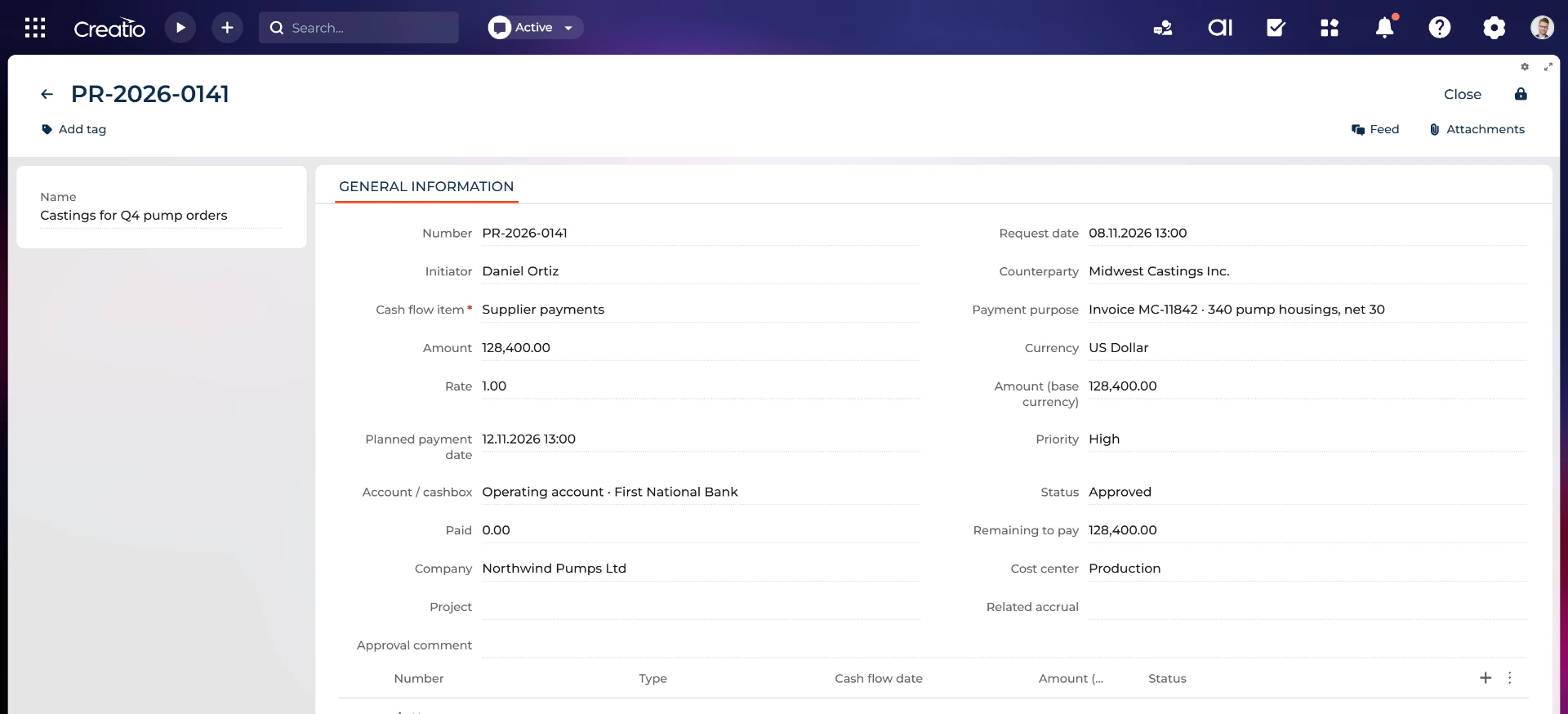
Each payment request has a counterparty, purpose, priority, cost center, cash flow item and planned date; numbering is automatic. Approval is a status change, not an approval route with visas, tasks or notifications.
Statuses are Draft, InApproval, Approved, Rejected, PartiallyPaid and Paid. Approval requires a cash flow item and cash account and freezes amount and currency; a corrected amount needs a new request.
Payments are Planned or Actual. Only Actual payments reduce the remaining amount and move the request to PartiallyPaid or Paid; the request tracks paid and remaining amounts.
Comparison
| Criterion | Syntech Finance Center | Excel and email | BAS / 1С: Бухгалтерія | Odoo Accounting |
|---|---|---|---|---|
| Solution type | Management accounting and treasury inside Creatio | Manual data transfer | Statutory accounting system | Odoo ERP accounting module |
| Request fields | Counterparty, purpose, priority, cost center, cash flow item, planned date; automatic number. | Manual spreadsheets and data transfer. | check with the vendor | check with the vendor |
| Statuses and approval | Draft, InApproval, Approved, Rejected, PartiallyPaid, Paid; status change only, no route. | Manual spreadsheets and data transfer. | check with the vendor | check with the vendor |
| Partial payment | Only Actual payments reduce the remainder and change status. | Manual spreadsheets and data transfer. | check with the vendor | check with the vendor |
| Remaining amount | Paid and remaining amounts are tracked on the request. | Manual spreadsheets and data transfer. | check with the vendor | check with the vendor |
| Payment calendar link | Approved and PartiallyPaid remainders enter the forecast. | Manual spreadsheets and data transfer. | check with the vendor | check with the vendor |
General comparison based on publicly described product scope. Check specific editions with each vendor.
FAQ
Is there an approval route with visas?
No: approval is a status change only, with no route, visa, task or notification.
Who can approve a request?
Anyone who can edit it, unless editing is restricted with Creatio object rights.
Can a request be paid in parts?
Yes. Actual payments reduce the remainder and change the status to PartiallyPaid or Paid.
Why is the amount frozen after approval?
Amount and currency are frozen by approval; a corrected amount requires a new request.
Does a request create a ledger entry?
No. Neither requests nor planned payments create ledger entries.
Does a request enter the payment calendar?
The remainder of Approved and PartiallyPaid requests is included in the calendar.
Related answers: Syntech Finance Center
- How can you see a cash gap before the account runs out of money? →
- How do you control budgets by item and cost center before money is spent? →
- How do you get P&L, Cash Flow and a management balance in Creatio without Excel? →
Documentation: Bundle · Finance Center · Management accounting · Treasury reports