
Syntech Finance Center (management accounting and treasury for Creatio)
SYNTECH, official Creatio partner, Kyiv
How do you control budgets by item and cost center before money is spent?
Updated: · Grygoriy Synieok
How it works in Syntech Finance Center: budget, plan-fact, cost center, P&L item, commitment, free budget
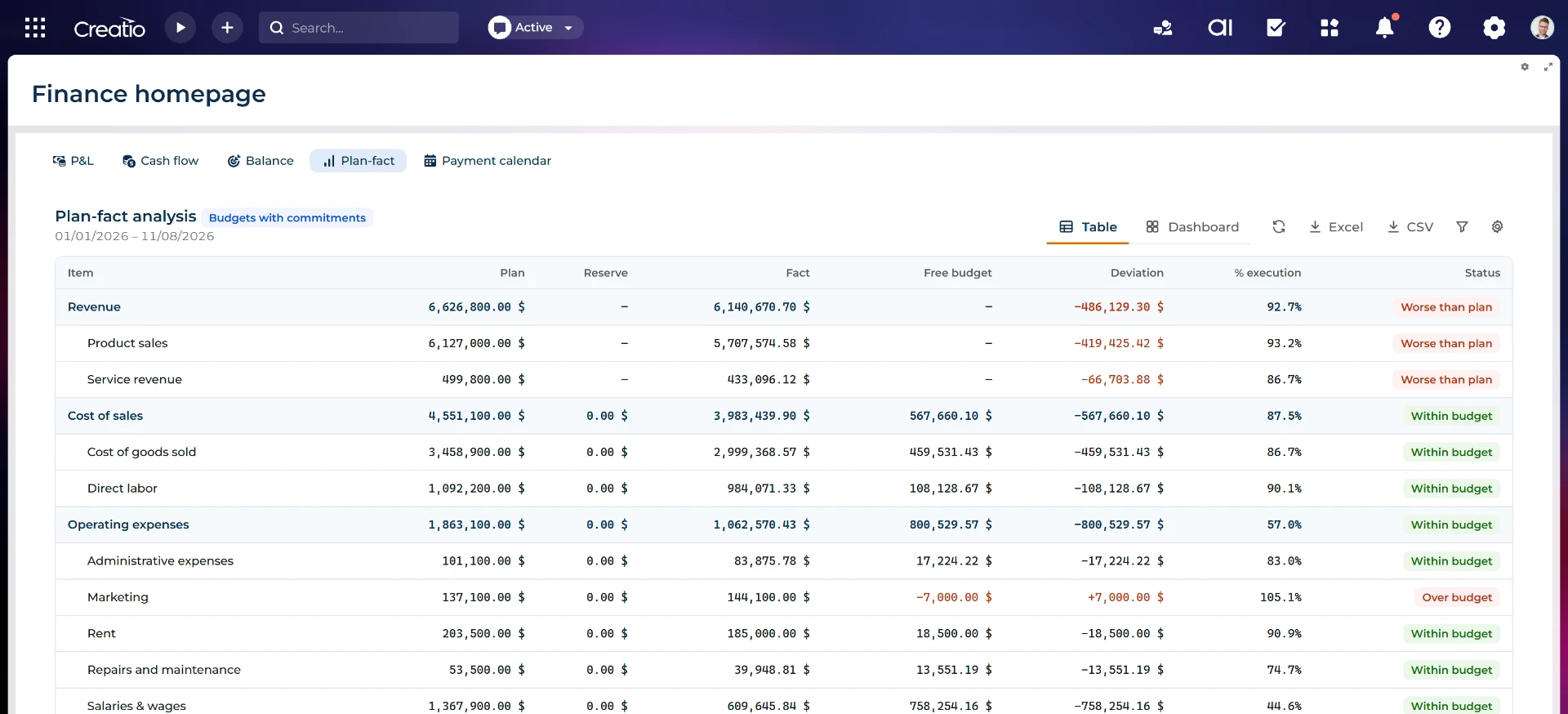
Budgets are monthly by cost center and P&L item. Plan-fact shows plan, commitment, fact, free budget and deviation; a cost center includes its descendants.
Plan and Forecast scenarios and versions are supported; only the current version counts. Lines are converted to the base currency. Statuses are Within budget, Over budget, Worse than plan and Over-committed.
In Manufacturing Finance an approved purchase request reserves budget until invoicing. The reserve follows line changes and releases on cancellation; Off / Warn / Block compares purchasing with the free budget of its cost center and P&L item.
Comparison
| Criterion | Syntech Finance Center | Excel and email | BAS / 1С: Бухгалтерія | Standalone FP&A service |
|---|---|---|---|---|
| Solution type | Management accounting and treasury inside Creatio | Manual data transfer | Statutory accounting system | Standalone budgeting and planning service |
| Budget dimensions | Month, cost center and P&L item; cost-center hierarchy. | Manual spreadsheets and data transfer. | check with the vendor | check with the vendor |
| Scenarios and versions | Plan, Forecast; only current version counts. | Manual spreadsheets and data transfer. | check with the vendor | check with the vendor |
| Approved spending commitments | Approved purchases through Manufacturing Finance until invoicing; releases on cancellation. | Manual spreadsheets and data transfer. | check with the vendor | check with the vendor |
| Deviation statuses | Within budget, Over budget, Worse than plan, Over-committed. | Manual spreadsheets and data transfer. | check with the vendor | check with the vendor |
| Over-budget blocking | Off/Warn/Block; Block leaves the request Draft with a reason. | Manual spreadsheets and data transfer. | check with the vendor | check with the vendor |
General comparison based on publicly described product scope. Check specific editions with each vendor.
FAQ
How is the budget planned?
Monthly by cost center and P&L item, with Plan/Forecast scenarios and a current version.
Where does a commitment come from?
Approved Manufacturing purchase requests via Manufacturing Finance reserve budget until invoicing.
Which statuses does plan-fact show?
Within budget, Over budget, Worse than plan and Over-committed.
Can over-budget purchases be blocked?
Yes. Block leaves the request in Draft with a reason; Warn continues with a warning; Off disables the check.
Is the cost-center hierarchy included?
Yes, the selected cost center includes the centers below it.
Can plan-fact be filtered by project?
No. Budgets have no project dimension.
Related answers: Syntech Finance Center
- How do you approve payment requests and see what remains to be paid? →
- How can you see a cash gap before the account runs out of money? →
- How do you get P&L, Cash Flow and a management balance in Creatio without Excel? →
Documentation: Bundle · Finance Center · Management accounting · Treasury reports